
Every feature, and the honest limits of each
Nothing here is a roadmap. Where a feature cannot know something — a send time a browser was never told, a chat you have not opened — this page says so, because the extension says so too.
Speed engine
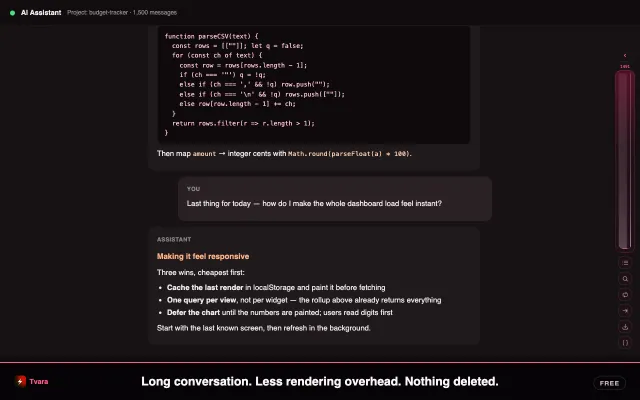
Off-screen messages are put to sleep so the browser stops paying for what you cannot see. A safety zone of about a screen and a half above and below your viewport stays awake, so scrolling never shows a blank.
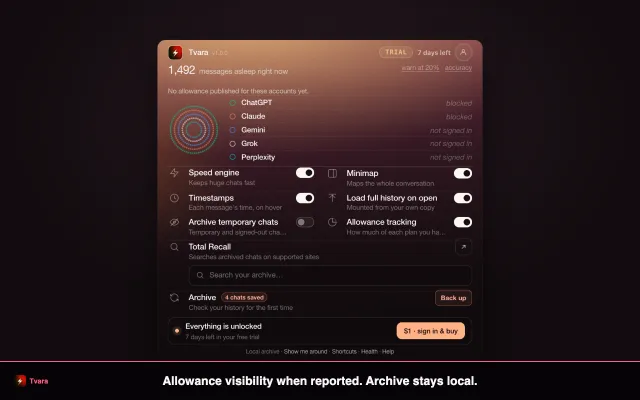
It is automatic on chats longer than roughly 25 messages, and the popup shows live proof: an honest 1,491 of 1,500 count, per site. Nothing is deleted and nothing leaves your archive.
- Where
- Supported AI sites
- Plan
- Free
- Off switch
- Popup · Speed engine
- Never
- The extension does not scroll your page on its own. Mounting older messages is a separate button you press.
Minimap
A compact navigator on the right edge showing the shape of the whole conversation: your prompts, the answers, code blocks, and the count of sleeping messages. At rest it is a thin rail about as wide as a scrollbar with a bright thumb where you are.
Hover any bar for a preview, click to jump — one click lands, hundreds of turns away, even where the site has unloaded the message. Focus it and Home, End, Page Up, Page Down and the arrows all work. The handle collapses it to a corner.
- Toolbar
- Outline, mount older messages, Markdown and JSON backup, search, Context Bridge, continue in a new chat
- Plan
- Free
- Off switch
- Popup · Minimap
A more complete map where supported
On ChatGPT, Tvara can use available conversation data to extend the map beyond the part the page has currently rendered. Nothing scrolls automatically.
Other providers build the map from what is available in the page and local archive. Provider interfaces can change, so Tvara labels degraded support instead of pretending the map is complete.
- Where
- ChatGPT today. Elsewhere the map builds from what is on the page.
- Side effect
- The chat you are reading gets fully archived for free
Outline and starred messages
A live table of contents built from every prompt you sent plus every heading in the answers. Click an entry to jump — a heading takes you to that heading, not to the top of the answer holding it. Very long chats list the first 400 entries and say so; it never silently truncates.
Stars are bookmarks inside a conversation: hover any message, click the star, and it gets a gold edge. They are saved per conversation, survive reloads, and the most recent 60 per conversation sync to your other signed-in browsers while the full set stays on this one.
- Open
- The list icon on the minimap toolbar
- Tabs
- Outline (everything) and Starred (only yours)
- Plan
- Free · Pro or trial on Claude and Gemini
In-chat search
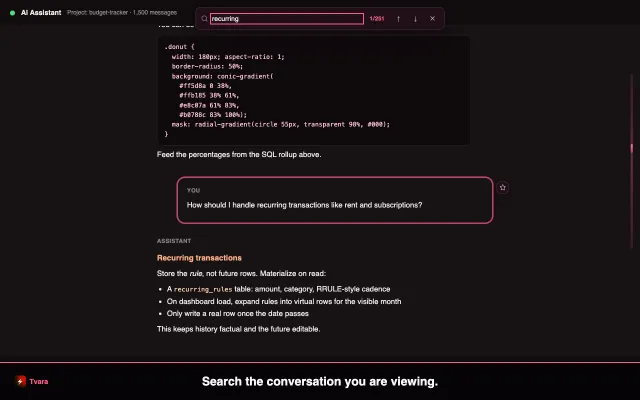
Local full-text search across the entire conversation including sleeping messages — it searches a text cache rather than the rendered page, so the speed engine costs you nothing here.
The match counter updates as you type. Enter jumps to the next match, Shift+Enter to the previous, Escape closes. Each jump scrolls to the match and pulses it.
- Keys
- ⌘⇧F Ctrl+Shift+F
- Plan
- Free · Pro or trial on Claude and Gemini
Message timestamps
AI chat sites never show when anything was said. Hover a message and a small time tag appears.
The honesty rule: on ChatGPT you get the real send time of your whole history, read locally from the app's own state by a read-only script that makes no network request. On other sites browsers simply do not have historical send times, so messages are stamped from when the extension first saw them and labelled first seen · this device. Messages that existed before you installed say time unknown.
- Plan
- Free · Pro or trial on Claude and Gemini
- Off switch
- Popup · Timestamps
Chat Card
Hover a conversation in the site's own sidebar and a small card tells you about it before you open it: how many messages, how many questions you asked, how many you starred, when it was created or first seen, when you last opened it, and whether it is your longest chat on that site.
What it cannot know: chats you have never opened. The sites do not put other conversations' data in the page and this extension has no server to ask, so an unopened chat says not tracked yet rather than guessing.
- How
- Hover. No clicks.
- Plan
- Free
Resume where you left off
The exact message you were reading in each long chat is remembered, anchored to the message itself rather than a pixel position, so it survives reloads and layout changes. Reopen the chat and a chip offers to take you back; scroll away deliberately and it dismisses itself.
- Plan
- Free
One-click backup
The loaded conversation as a clean file on your disk. Markdown keeps headings, lists, code fences and timestamps and drops straight into Obsidian or Notion. JSON is structured — role, text and timestamp per message — for your own scripts.
Scheduled encrypted backups are separate: .lctbackup files written to your Downloads folder, sealed with a passphrase you choose and that we cannot recover. The file assumes it will be stolen — a million PBKDF2 rounds wrap a random file key and the body is AES-256-GCM, with both layers authenticating the header, so a downgraded file fails to open rather than opening weaker.
- Where
- Minimap toolbar, and the Recall page for encrypted archives
- Plan
- Archive export is free. One-click export is Pro or trial on Claude and Gemini, as is encrypted backup everywhere.
Total RecallPro
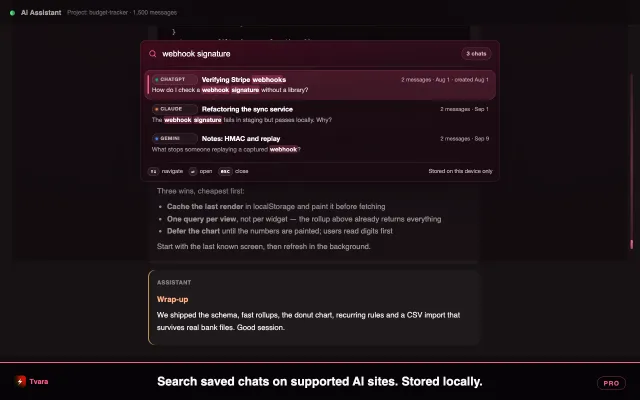
One local search box across chats you archived on supported AI sites. Click a result to open the matching conversation with in-chat search ready.
The archive builds itself: a check runs roughly every three hours, shortly after the browser starts, and when you open a chat site — at most once every twenty minutes — reading the history endpoints of accounts you are already signed into and writing only what is missing. Progress covers the archive pass across supported sites.
Temporary chats are off by default, because a temporary chat is you telling that platform not to keep it. Switch it on and they are archived locally too, labelled as temporary, with a badge on the page for as long as one is being archived — never a silent recording.
- Keys
- ⌘⇧K Ctrl+Shift+K
- Search runs
- On your machine. There is no server to send conversations to.
Context BridgePro
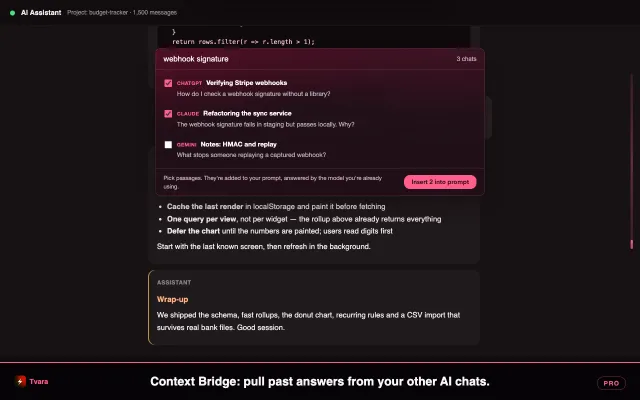
You worked it out with one model; the next one knows none of it. While composing a prompt on a supported site, Recall searches your local archive, shows relevant passages, and lets you choose what to add to the prompt you are writing.
It calls no API of ours, uses no key and runs no model — it feeds context to the model you are already signed into and paying for. A long chat contributes several passages from different points in the thread rather than three views of one paragraph. You always pick before anything is inserted, and if the prompt box cannot be found it copies to your clipboard instead of touching a page it does not understand.
- Keys
- ⌘⇧U Ctrl+Shift+U
- Fail-safe
- Clipboard, never a surprise insertion
Continue in a new chatPro
When a chat gets long, slow, or hits a limit, one click opens a fresh one with the context already in the prompt box: your original ask, your starred messages, the last few turns. Quoted, never summarised, and nothing is sent for you — you press send.
- Where
- Minimap toolbar
Allowance tracking
The apps warn you about your plan limit by cutting you off. Tvara warns at 20% and again at 10%, on whichever model is running down, using the provider's own figure rather than an estimate.
It is strictly passive. A page-world reader observes the rate-limit information the sites' responses already carry; requests are never altered, blocked, delayed or replayed. It reads rate-limit headers, and opens a response body only when the URL's own path says the response is about limits — never chat traffic, never a stream. A provider that publishes nothing gets not reported, never a guess.
- Off switch
- Popup · Allowance tracking. With it off, the hooks disable themselves.
- Kept
- A redacted diagnostic sample in which every string over 40 characters is replaced by its length
Deletion quarantine
Deleted there is not deleted here. A once-daily full listing is what notices a chat has gone from the provider, and the extension refuses to act on an implausible one — a signed-out session can never present your whole archive for deletion. You are told, and you decide what to keep.
- Where
- Popup alert, and the deletions panel on the Recall page
What it looks like
Screenshots from the extension, on a demo conversation of 1,500 messages.
None of this leaves your browser
No chat text, no titles, no prompts and no exports are ever sent to us or to anyone else. The release package uses non-obfuscating minification only, and the licence issuer source is in the repository, so every sentence on this page is a statement about code you can read.